
Forgotten Phone1.9 - Google Play
You'll be able to see results in few seconds.
Publisher Description
Have Missed Calls, Texts Forwarded to Your Email InBox
Have you ever missed an important call or SMS because your phone was inaccessible or silent? Perhaps you forgot to put it in your pocket as you were rushing out of the door in the morning. Maybe you need to keep your mobile silenced or shut off during part of the day to prevent disturbances or interruptions. You might have separate work and personal phones and prefer not to carry them both with you at all times. Or maybe you just can't find your device, right now. How can you make sure that you learn about those truly crucial calls and texts in a timely fashion, even if your device has been left behind, silenced, or mislaid?
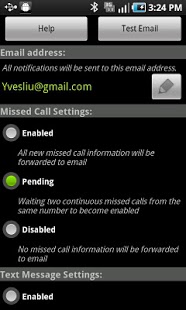
Forgotten Phone offers a reliable, discreet solution: the app forwards your missed call information and text messages (SMS and MMS) to a preconfigured email address that you can monitor until you get your phone back. Once activated, Forgotten Phone begins to automatically transmit missed call information and text messages to the specified email address. The forwarded information includes contact attempt times, phone numbers, and (if available) contact names, plus text content and notice of any attachments. Just check your email to review all of your text messages and find out the names of any address book contacts who have been calling you, as well as the numbers of any other callers.
You can customize Forgotten Phone's forwarding settings for both missed calls and text messages. Settings include: 1) enabled, the highest setting, indicating that everything will be forwarded; 2) pending, the second-highest setting, activated only after two failed contact attempts from a particular number; and 3) disabled.
About Forgotten Phone
The company that develops Forgotten Phone is Pacific Software Solutions, Inc.. The latest version released by its developer is 1.9.
To install Forgotten Phone on your Android device, just click the green Continue To App button above to start the installation process. The app is listed on our website since 2013-12-28 and was downloaded 0 times. We have already checked if the download link is safe, however for your own protection we recommend that you scan the downloaded app with your antivirus. Your antivirus may detect the Forgotten Phone as malware as malware if the download link to pss.ForgottenPhone is broken.
How to install Forgotten Phone on your Android device:
- Click on the Continue To App button on our website. This will redirect you to Google Play.
- Once the Forgotten Phone is shown in the Google Play listing of your Android device, you can start its download and installation. Tap on the Install button located below the search bar and to the right of the app icon.
- A pop-up window with the permissions required by Forgotten Phone will be shown. Click on Accept to continue the process.
- Forgotten Phone will be downloaded onto your device, displaying a progress. Once the download completes, the installation will start and you'll get a notification after the installation is finished.
Program Details
System requirements
Download information
Pricing
Version History
version 1.9
posted on 2013-12-28
Version 1.9,- Fixed on 4.4 Kitkat, MMS won't be forwarded issue,Version 1.8,- Fixed sometimes MMS got forwarded too late problem,Version 1.7,- Fixed on some phones, restart device will not restart ForgottenPhone. It is all working now.,Version 1.6,- If you prefer to set the sender email address for the notification email, you can set it through menu-> Settings,Version 1.5:,- Added Spanish Support,Version 1.4:,- Minor Bug fixes,- Added Chinese support,Version 1.3:,- Added Japanese support
version 1.8
posted on 2013-04-17
Several fixes and updates
Disclaimer
Official Google Play Link
We do not host Forgotten Phone on our servers. We did not scan it for viruses, adware, spyware or other type of malware. This app is hosted by Google and passed their terms and conditions to be listed there. We recommend caution when installing it.
The Google Play link for Forgotten Phone is provided to you by apps112.com without any warranties, representations or guarantees of any kind, so access it at your own risk.
If you have questions regarding this particular app contact the publisher directly. For questions about the functionalities of apps112.com contact us.
